What it is
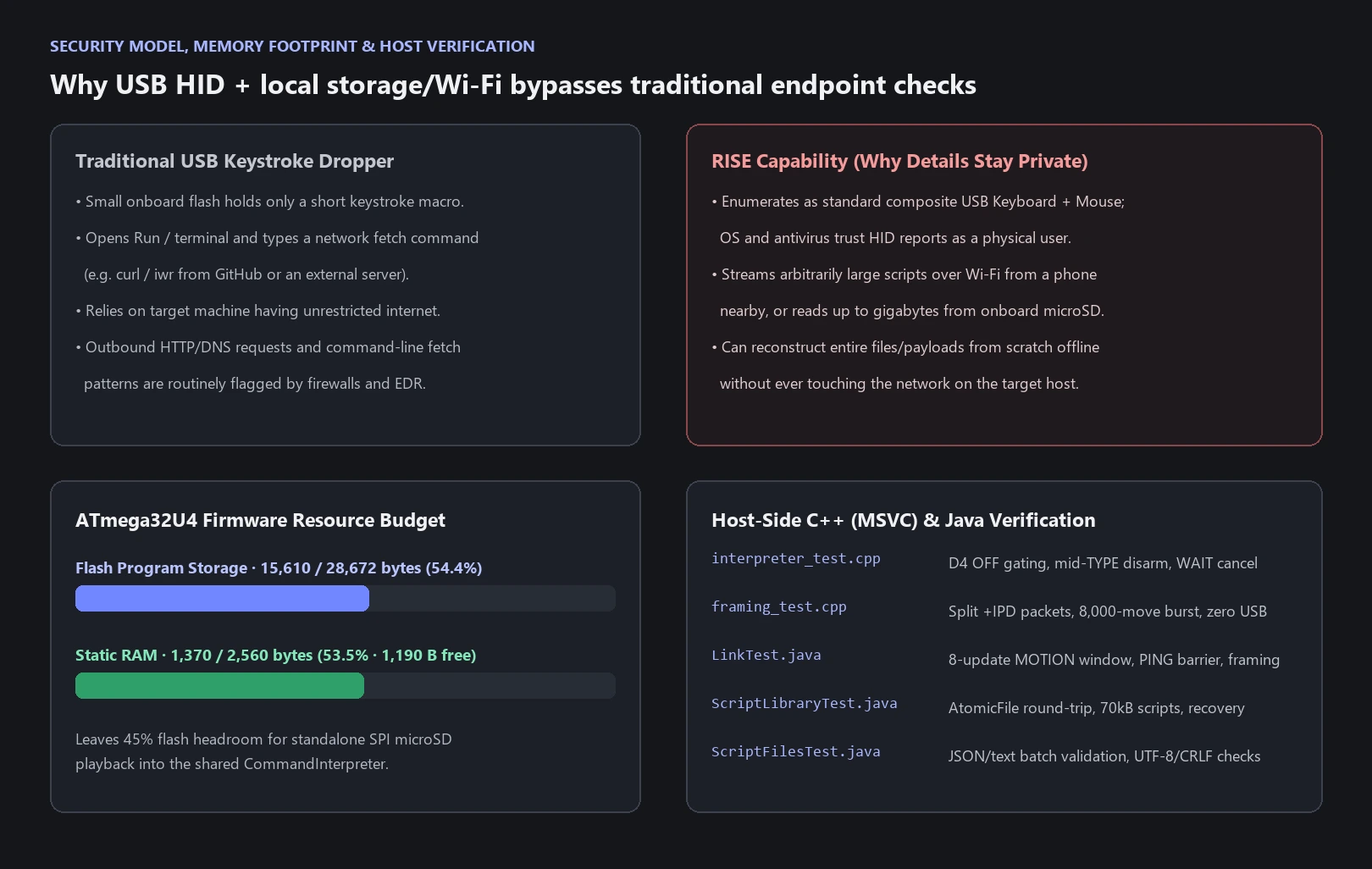
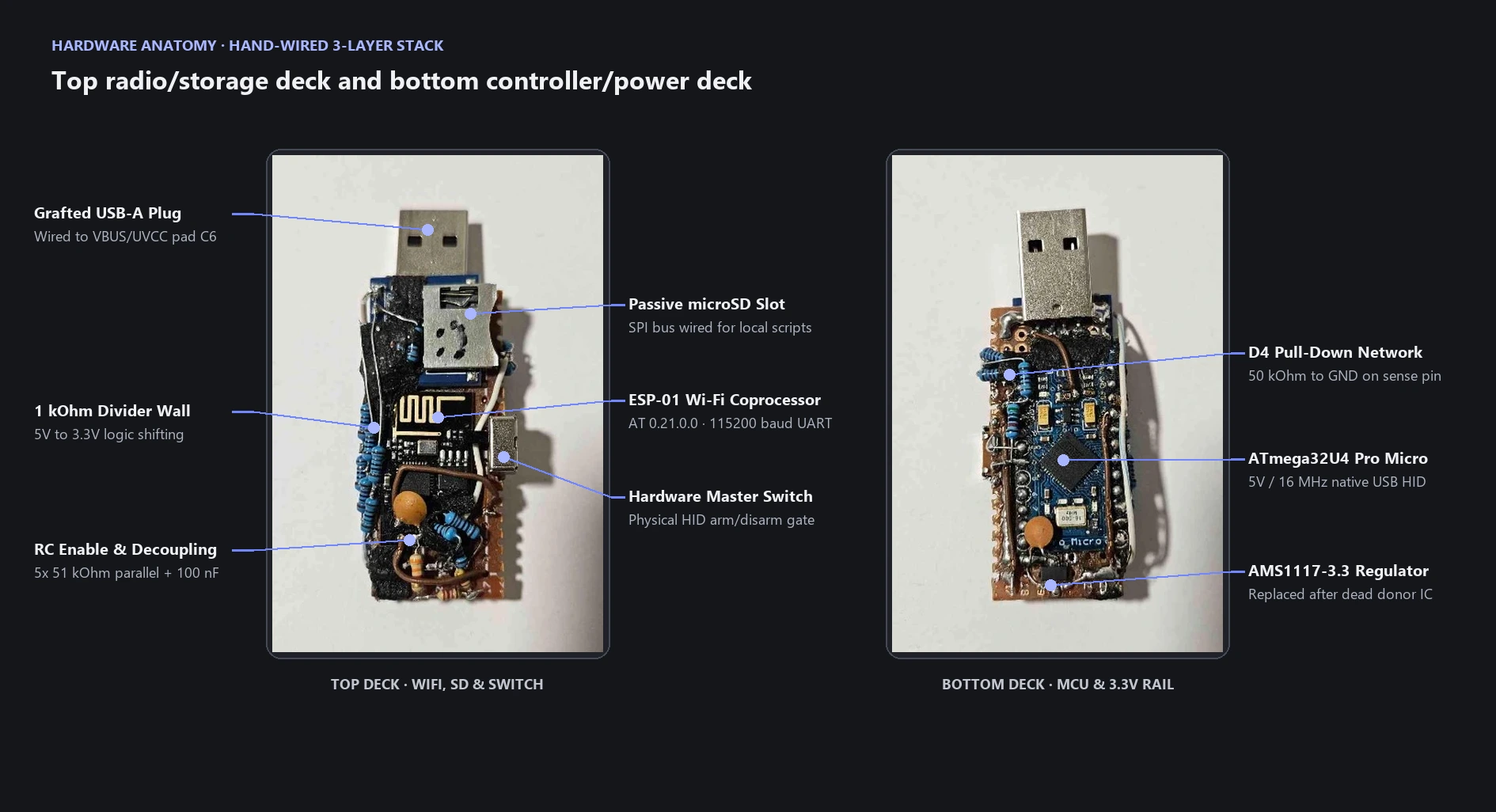
RISE (Remote Input & Script Execution) is a compact, Wi-Fi-connected USB HID device that plugs into a computer like a normal flash drive and lets an Android phone control the host cursor, type text, and stream automated input scripts. Under the hood, it combines a 5 V / 16 MHz ATmega32U4 Pro Micro (which handles native USB keyboard and mouse emulation), an ESP-01 Wi-Fi coprocessor running over hardware UART, a passive microSD breakout for onboard script storage, a dedicated 3.3 V regulator, and a physical hardware slide switch on the side.
That physical switch acts as a hard permission gate for every USB action. When the switch is open, the phone can still connect over Wi-Fi, check uptime, and poll the device state, but the microcontroller refuses to emit keyboard or mouse reports and immediately releases any held keys or buttons the moment the switch is flipped off.
Making do with what I had
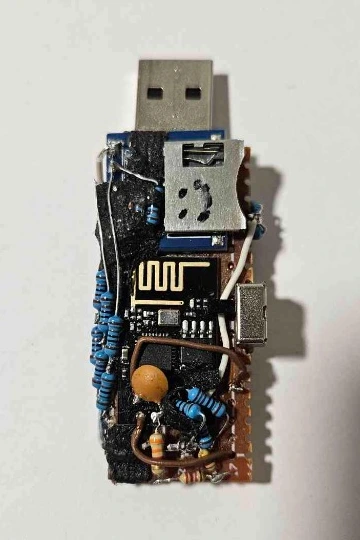
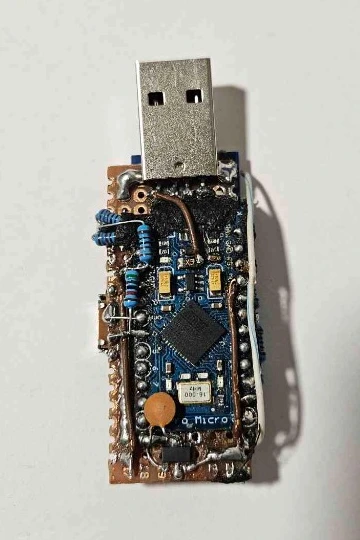
Looking at the photos, the device is noticeably messy. To squeeze three separate boards, a voltage regulator, ceramic capacitors, a slide switch, and nearly two dozen through-hole resistors into the profile of a USB stick, I had to wire everything on top of each other in a three-layer sandwich on a scrap of perfboard.
If I had the funds and wanted to take this to a clean production form factor, I would design a custom multi-layer PCB from scratch and assemble it with small surface-mount components chosen specifically for this layout. It could easily be a fraction of the thickness. Instead, I had to make do with the parts sitting on my desk. For the 5 V to 3.3 V digital signal lines (UART transmit and the three SPI lines to the microSD slot), I built resistor dividers out of parallel through-hole 1 kOhm resistors and stacked them along the edges of the board. When the ESP8266 enable pin (`EN / CH_PD`) needed roughly 10 kOhm for its startup RC delay and I only had 51 kOhm resistors left, I soldered five 51 kOhm resistors in parallel to get 10.2 kOhm.
Hardware mistakes, a dead donor regulator, and bring-up scars
I worked through the hardware bring-up alongside ChatGPT, logging every failure and fix in the repository as we went. Very little worked on the first try, and most of the early roadblocks came from salvaged parts, soldering mistakes, or following wiring diagrams meant for different boards.
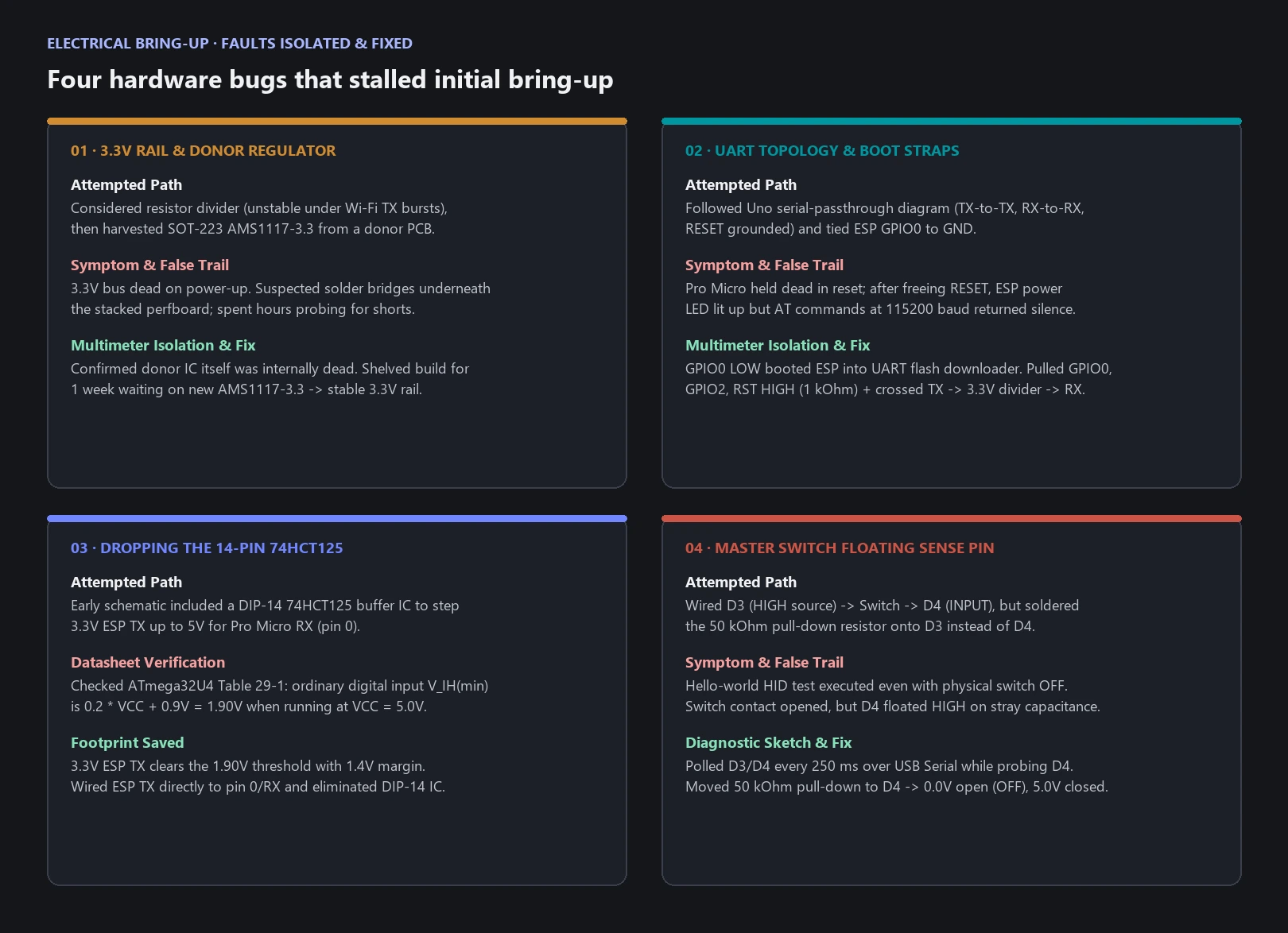
1. The dead donor 3.3 V regulator that cost a week
The Pro Micro runs at 5 V, while both the ESP-01 radio and the microSD slot strictly require 3.3 V power. Early on, I briefly explored the idea of using a voltage divider to drop 5 V down to 3.3 V, before realizing a resistor divider cannot supply stable current for Wi-Fi transmit bursts. I found a dedicated SOT-223 3.3 V regulator (`AMS1117-3.3`, where the metal tab is actually `OUT` rather than ground) on an old donor board and desoldered it for the build.
What I did not know was that the regulator from the donor board was already broken. Once I wired it in, the 3.3 V rail refused to come up properly, which kicked off a long debugging spiral. Because the whole assembly was hand-wired so tightly on perfboard, I assumed I had shorted a pad or bridged a trace underneath the stack. I spent hours chasing phantom shorts across my own soldering before finally sitting down with a multimeter, isolating the power stage, and proving that the salvaged regulator itself was dead. I had to shelve the entire project for a week until a new replacement 3.3 V regulator arrived. Soldering the new regulator onto the bottom edge of the board solved the power issue immediately.
2. Grafting on a full-size USB-A plug
To make the device plug directly into a computer without a cable, I removed the Pro Micro's fragile micro-USB connector and soldered a full-size male USB-A plug onto the end of the perfboard. Removing the original connector tore up the input path and knocked off an onboard decoupling capacitor (`C6`). To restore USB power safely, we traced the SparkFun Pro Micro PCB reference layout, jumped the replacement USB plug's +5 V line directly to pad 2 of `C6` on the `VBUS/UVCC` net, kept `D-` and `D+` on their series termination resistor pads, and fed the 3.3 V regulator from the board's regulated 5 V rail.
3. Falling for the Arduino Uno adapter diagram
My first attempt at wiring the ESP-01 UART followed a popular "Arduino to ESP-01" diagram that connected `TX` to `TX`, `RX` to `RX`, and tied the Arduino `RESET` pin to ground. That wiring is meant for using an Arduino Uno as a dumb USB-to-serial bridge by holding its main microcontroller in permanent reset. On a Pro Micro, the ATmega32U4 runs the actual firmware and talks to the ESP over hardware `Serial1` (pins `0/RX` and `1/TX`) while keeping USB `Serial` separate. Grounding `RESET` killed the controller, and wiring `TX` to `TX` pitted both transmitters against each other. Freeing `RESET` and crossing Pro Micro `1/TX` (through a 500 Ohm / 1 kOhm divider) to `ESP RX` fixed the bus.
4. Grounding GPIO0 into silent bootloader mode
Even with the UART crossed properly and the new 3.3 V regulator working, sending `AT` commands over `Serial1` produced complete silence despite the ESP power LED glowing. In an earlier wiring pass, I had tied `GPIO0` to ground. On the ESP8266, holding `GPIO0` low at reset boots the chip into its UART flash downloader instead of running the installed AT firmware. On top of that, resetting only the Pro Micro does not reset the ESP-01. Pulling `GPIO0`, `GPIO2`, and `RST` high to 3.3 V through 1 kOhm resistors and power-cycling the whole USB stick finally brought up `AT 0.21.0.0` at 115200 baud.
5. Dropping a 14-pin level shifter after reading the datasheet
Our early schematic called for a 14-pin `74HCT125` buffer IC just to step the ESP's 3.3 V `TX` signal up to 5 V for the Pro Micro's `0/RX` pin. Fitting a DIP-14 chip onto the stick would have been brutal. Checking Table 29-1 of the ATmega32U4 datasheet showed that the minimum input-high voltage (`V_IH`) for standard digital pins at a 5 V supply is `0.2 * VCC + 0.9 V`, which is 1.9 V. Because a 3.3 V UART output clears 1.9 V with plenty of margin, I wired `ESP TX` straight into Pro Micro `0/RX` and scrapped the level-shifter IC completely.
6. Soldering the master switch pull-down on the wrong pin
The physical slide switch on the side of the stick connects `D3` (configured as a `HIGH` signal source in firmware) to `D4` (the sense input configured as `INPUT`). When I flashed the first keyboard test with the switch turned off, the board still thought it was armed. I had soldered the 50 kOhm pull-down resistor to `D3` instead of `D4`, leaving `D4` floating whenever the switch was open. Flashing a tiny diagnostic sketch that printed both pin states every 250 ms (`D3 source=1 D4 input=0 OFF` vs. `ARMED`) and probing `D4` with a multimeter caught the floating pin right away. Moving the 50 kOhm pull-down to `D4` locked the open state to 0 V.
System architecture and fixing the 64-byte UART bottleneck
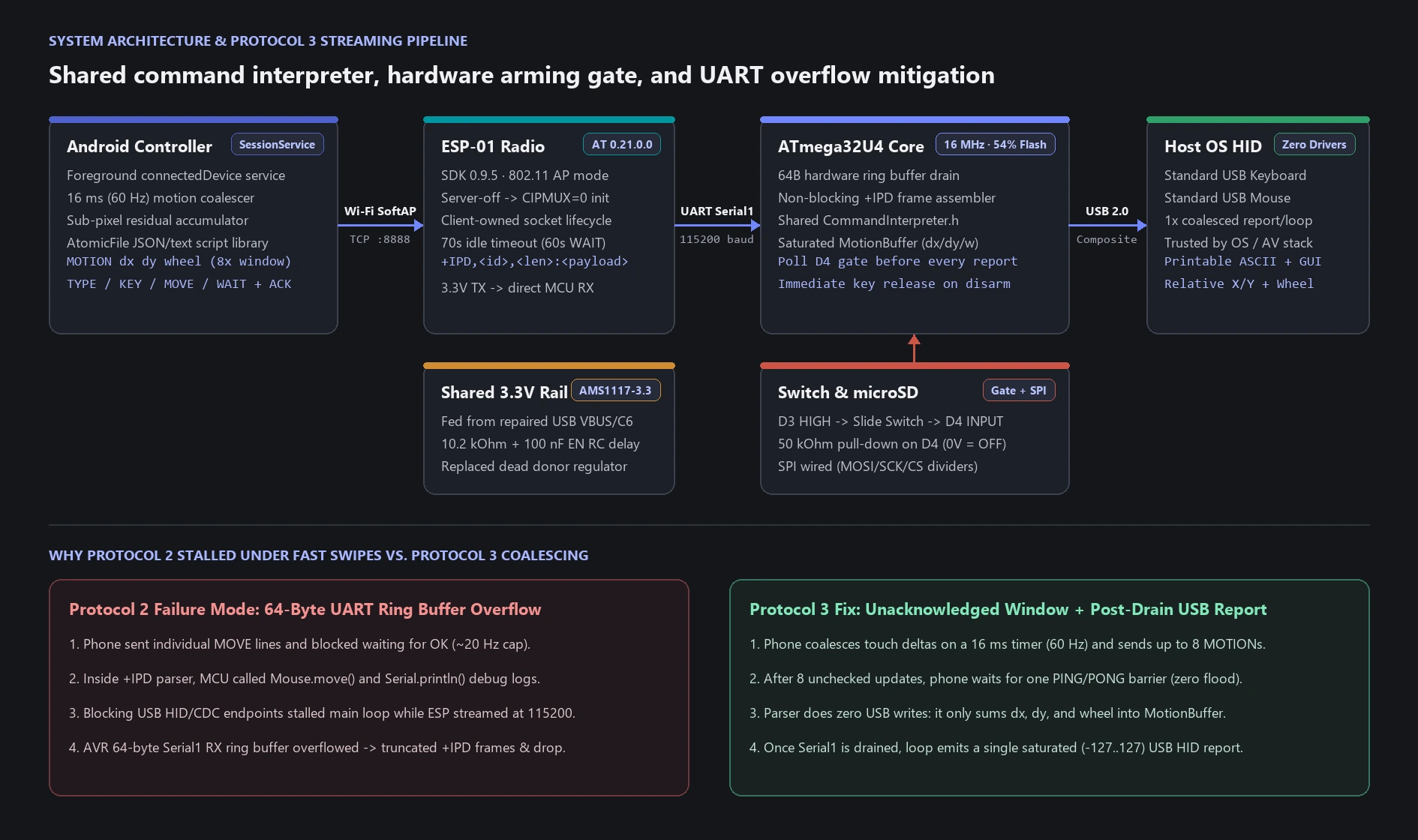
With the hardware stable, we hit two software layers that needed careful engineering: compatibility with the older `AT 0.21.0.0` (SDK 0.9.5) firmware on the ESP-01, and a severe bottleneck when streaming live 60 Hz touchpad movement from the phone.
On the AT firmware side, warm-resetting the Pro Micro initially caused setup to fail with `CIPMUX and CIPSERVER must be 0` when issuing `AT+CIPMODE=0`, because the ESP retained its running TCP server across microcontroller resets. We fixed the state machine to tear down any active server (`AT+CIPSERVER=0`) and disable multiplexing (`AT+CIPMUX=0`) before setting normal transmission mode, tolerate unsupported newer AT commands (`AT+CIPDINFO=0`, `AT+CIPRECVMODE=0`), and let the Android client own socket closure so an unconditional `AT+CIPCLOSE` from the Arduino would not race the phone and throw `link is not / ERROR`.
The hardest bug appeared in Protocol 2 as soon as I swiped fast across the Android touchpad: `+IPD` frames arrived truncated and the connection dropped within seconds. The root cause was a collision between two constraints:
- In Protocol 2, the phone waited for an `OK` acknowledgement over Wi-Fi after every single movement command, capping throughput near 20 updates per second.
- On the ATmega32U4, the Arduino AVR core's `Serial1` hardware receive ring buffer is only 64 bytes. Inside the `+IPD` packet parser, the sketch was calling blocking USB HID mouse writes and printing `RX` / `TX` debug logs to USB Serial. While USB endpoints blocked, incoming 115200-baud UART traffic from the ESP overflowed the 64-byte ring buffer and sliced the next `+IPD` header in half.
Protocol 3 solved this by splitting live pointer motion (`MOTION`) from acknowledged script commands (`MOVE` and `SCROLL`). We removed all USB HID calls and runtime serial logging from the UART parser. As `+IPD` bytes arrive, the parser validates each line and accumulates `x`, `y`, and `wheel` deltas in a small `MotionBuffer` struct:
struct MotionBuffer {
  int16_t x = 0;
  int16_t y = 0;
  int16_t wheel = 0;
  bool pending = false;
};
Only after the `Serial1` receive buffer is completely drained does the main loop emit one combined USB mouse report (clamped to `-127..127` per axis). Meanwhile, the Android app coalesces finger movement on a 16 ms timer (60 Hz target) and sends at most eight unacknowledged `MOTION` updates before pausing for a single `PING` / `PONG` barrier, guaranteeing the phone can never flood the Arduino.
Shared command interpreter and Android controller
Both live phone input and automated scripts feed into a single transport-independent C++ executor (`CommandInterpreter.h`) on the Pro Micro. Keeping the interpreter decoupled from the TCP socket means any command source (Wi-Fi streaming today, or the onboard microSD reader next) uses the exact same validation, non-blocking `WAIT` polling, and hardware master-switch checks:
| Command | Behavior | Flow control |
|---|---|---|
MOTION x y wheel | Coalesced live pointer delta (`-127..127` per axis) | Unacknowledged; 8-update `PING` window |
MOVE x y / SCROLL n | Scripted relative cursor step or wheel scroll | Acknowledged (`OK` / `ERR`) per line |
CLICK LEFT|RIGHT|MIDDLE | Immediate mouse button press and release | Acknowledged (`OK` / `ERR`) |
TYPE text | Printable ASCII typing (chunked at 80 chars max) | Switch checked between characters |
KEY name | `ENTER`, `TAB`, `BACKSPACE`, `ESC`, `GUI` (Win), arrows, etc. | Acknowledged (`OK` / `ERR`) |
WAIT ms | Non-blocking timer (`0..60000` ms) polled in main loop | Interrupted immediately on disarm/disconnect |
RELEASE / PING | Clear held state or query protocol, switch, uptime, and motion rate | Permitted even while switch is `OFF` |
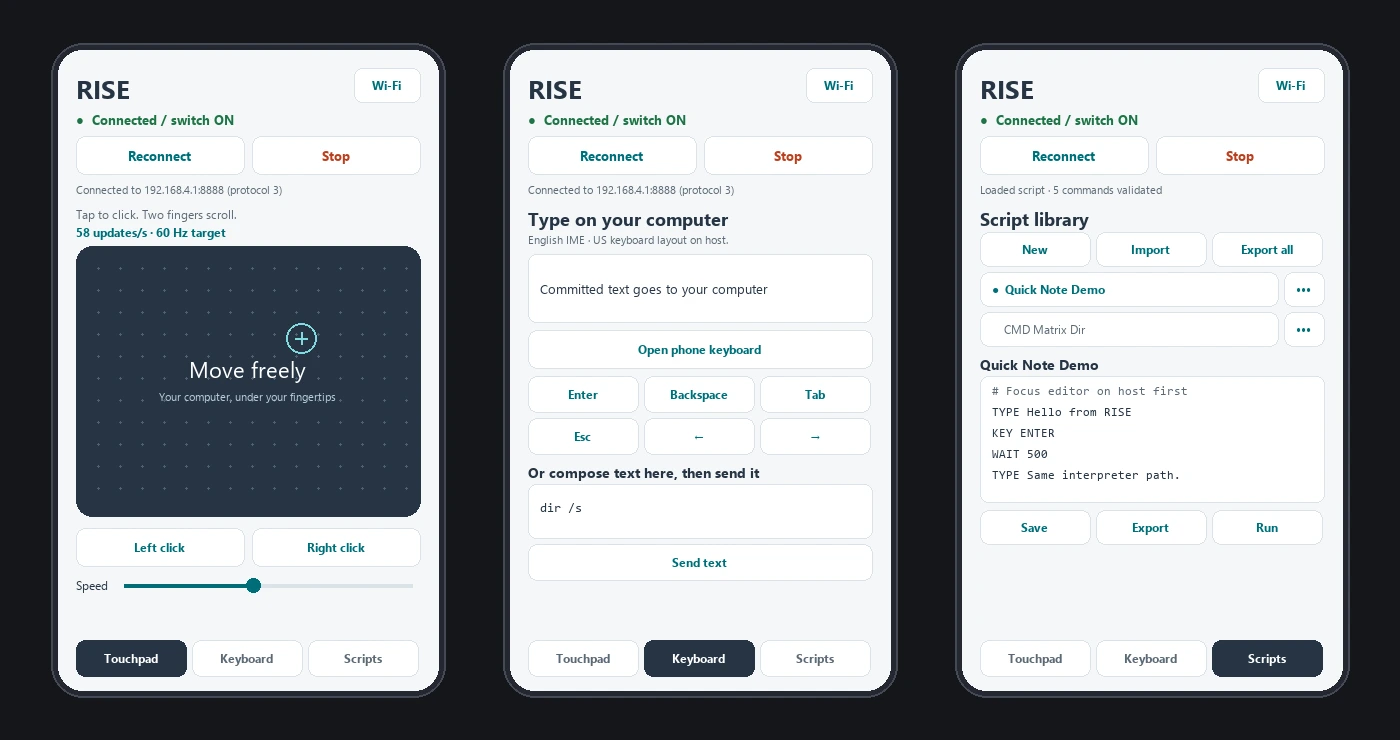
The companion Android app (`RISE Control`) is built directly with the standalone Android SDK (`build-tools 36`, API 35 target) without external dependencies. Connection ownership lives inside a foreground `connectedDevice` service (`SessionService`) holding Wi-Fi and CPU wake locks, so rotating the phone into landscape, locking the screen, or opening the Android document picker never drops an active session or aborts a running script. Touchpad tracking accumulates sub-pixel movement residuals so slow diagonal cursor motion stays smooth, and the script library uses `AtomicFile` storage with full batch validation before any JSON or plain-text import is committed.
Before flashing changes to the physical stick, a host-side regression suite compiles the microcontroller's C++ interpreter and `+IPD` framing parser under MSVC (against mocked Arduino/HID headers) alongside JUnit-style Java tests, verifying 8,000-update motion bursts, split TCP frames, mid-type switch disarming, and corrupt-storage recovery. On the ATmega32U4, the entire firmware compiles into 15,610 bytes of flash (54% of 28,672 bytes) and 1,370 bytes of static RAM, leaving 1,190 bytes free for stack and runtime state.
Ongoing status, untested microSD playback, and security implications
This build is still ongoing, and it has room to grow into several sub-projects, including dedicated cybersecurity research and defensive testing tools.
One hardware feature that is wired on the stick but still untested in firmware is standalone script execution from the onboard microSD slot. The SPI bus (`MOSI`, `SCK`, `CS` through 3.3 V dividers, and direct `MISO` return) is physically soldered and the shared `CommandInterpreter` was written specifically so an SD card reader can feed lines into the same `execute(line)` and `poll()` loop as the Wi-Fi adapter. The reason I have not tested the microSD slot yet is simple: the only microSD cards I currently own are the ones I rely on for my actual work, like flying my drone, and I cannot risk corrupting or damaging a working card inside a hand-soldered prototype.